

The Ultimate Data Migration Checklist: Ensure a Smooth Transition Every Time
Ensure a Smooth Transition Every Time

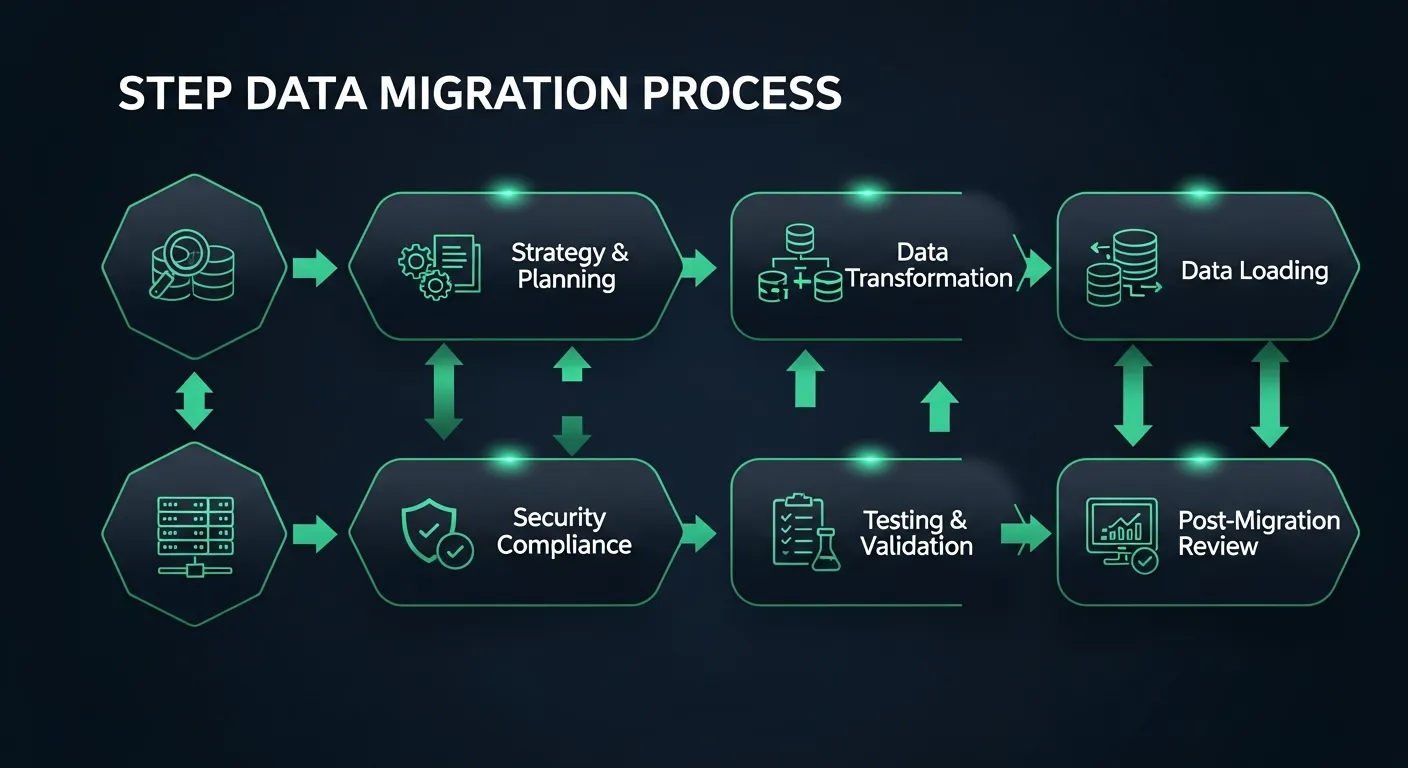
Did you know that "60% of data migration projects run over schedule, and a staggering 83% lead to unforeseen downtime"? Data migration is one of the most high-stakes undertakings any organization can face.
Whether you're moving to a new ERP system, upgrading your cloud infrastructure, or consolidating databases after a merger, the risks are real: data loss, corruption, extended downtime, and compliance violations can derail even the most well-intentioned projects.
That's why having a battle-tested data migration checklist isn't just helpful—it's essential. This comprehensive guide walks you through every critical step to ensure your next data migration is smooth, secure, and successful.
9-Step Checklist for Flawless Transitions
A successful data migration requires meticulous planning, rigorous testing, and disciplined execution. This 9-step checklist covers every phase of the migration journey, from initial planning through ongoing data management.
- Pre-Migration Planning
- Data Assessment and Preparation
- Technology and Infrastructure
- Security and Compliance
- Migration Process Design
- Testing and Validation
- Execution and Monitoring
- Post-Migration Activities
- Ongoing Data Management
1. Pre-Migration Planning
Every successful migration begins long before the first byte of data moves. Pre-migration planning is the foundation upon which everything else is built—skip it, and you're building on quicksand.
Assess Data Landscape
- Inventory all data sources, including databases, file systems, cloud storage, and third-party applications that hold business-critical information
- Document data volumes, formats, and interdependencies between systems to understand the full scope of the migration effort
- Identify data owners and stakeholders for each dataset to establish clear accountability and decision-making authority throughout the process
Define Clear Objectives
- Establish measurable success criteria such as acceptable downtime windows, data accuracy thresholds, and performance benchmarks that the migrated system must meet
- Align migration goals with broader business objectives—whether it's improving operational efficiency, enabling scalability, or meeting regulatory requirements
Build Migration Team
- Assemble a cross-functional team that includes project managers, data engineers, business analysts, security specialists, and representatives from each affected department
- Define clear roles, responsibilities, and escalation paths so that every team member knows exactly what's expected and who to contact when issues arise
Choose Migration Strategy
Selecting the right migration strategy is one of the most consequential decisions you'll make. Here are the three primary approaches:
Big Bang Migration: All data is migrated at once during a planned downtime window. This approach is faster and simpler to coordinate, but carries higher risk—if something goes wrong, everything is affected. Best suited for smaller datasets or systems where extended downtime is acceptable.
Trickle Migration: Data is migrated gradually in phases while both the old and new systems run in parallel. This approach is slower but significantly safer, as it allows you to validate each phase before proceeding. Ideal for mission-critical systems that cannot afford extended downtime.
Hybrid Migration: Combines elements of both Big Bang and Trickle approaches based on data criticality and system dependencies. Non-critical data may be migrated in bulk, while sensitive or complex datasets are moved incrementally. This flexible approach lets you optimize for both speed and safety.
2. Data Assessment and Preparation
Think of this step as spring cleaning before a big move. You wouldn't pack up a house full of junk and move it to a new home—the same logic applies to your data.
Data Audit
- Profile your data to understand its quality, completeness, and consistency across all source systems
- Identify duplicate records, orphaned data, and outdated information that should be archived or purged before migration
- Catalog data types, field lengths, and encoding formats to anticipate potential compatibility issues with the target system
Clean and Standardize
- Remove duplicate entries and merge records where appropriate using automated deduplication tools and manual review processes
- Correct data inaccuracies, fill in missing values where possible, and flag records that require business owner review
- Standardize naming conventions, date formats, address formats, and other data elements to ensure consistency in the target system
Map Your Data
- Create detailed source-to-target mapping documents that specify exactly how each field in the source system translates to the target system
- Define transformation rules and business logic for data that requires conversion, aggregation, or restructuring during migration
- Document default values, null handling rules, and edge cases to ensure the migration scripts handle every scenario correctly
3. Technology and Infrastructure
Your technology stack and infrastructure must be ready to support the migration process without becoming a bottleneck. This step ensures you have the right tools and environment in place.
Evaluate Tech Stack
- Assess compatibility between source and target systems, including database engines, APIs, middleware, and integration platforms
- Evaluate network bandwidth and latency between source and target environments, especially for cloud migrations or cross-region transfers
- Review licensing requirements and ensure all necessary software and platform subscriptions are in place before migration begins
Select Migration Tools
- Choose ETL (Extract, Transform, Load) tools that match your data complexity, volume, and transformation requirements
- Evaluate both commercial migration platforms and open-source alternatives based on your budget, timeline, and technical expertise
- Ensure selected tools support logging, error handling, and rollback capabilities for safe and auditable migration execution
Testing Environment
- Set up a dedicated testing environment that mirrors the production target system as closely as possible, including hardware specs, network configuration, and software versions
- Populate the testing environment with representative sample data that covers all data types, edge cases, and volume scenarios you expect to encounter
Plan for Capacity
- Calculate storage requirements for the target system, accounting for data growth projections and temporary staging areas needed during migration
- Ensure sufficient compute resources are available to handle migration workloads without impacting ongoing business operations
- Plan for peak load scenarios and establish resource scaling strategies to prevent performance degradation during the migration window
4. Security and Compliance
Data security during migration is non-negotiable. A single breach during the transition can expose sensitive information and result in regulatory penalties, legal liability, and reputational damage.
Secure Sensitive Data
- Classify all data by sensitivity level (public, internal, confidential, restricted) and apply appropriate security controls for each classification during migration
- Implement data masking or tokenization for sensitive fields such as Social Security numbers, credit card data, and personal health information in non-production environments
- Restrict access to migration tools and staging areas to authorized personnel only, using role-based access controls and multi-factor authentication
Encryption Measures
- Encrypt data in transit using TLS 1.2 or higher for all data transfers between source and target systems
- Ensure data at rest is encrypted in both source and target environments using industry-standard encryption algorithms (AES-256 or equivalent)
- Manage encryption keys securely using a dedicated key management service, with proper key rotation policies and access logging
Regulatory Compliance
- Identify all applicable regulatory requirements (GDPR, HIPAA, SOX, PCI-DSS) and ensure the migration process complies with each
- Document data handling procedures and maintain audit trails for all migration activities to demonstrate compliance during audits
- Conduct a privacy impact assessment if the migration involves cross-border data transfers or changes to how personal data is processed or stored
Backup and Recovery
- Create comprehensive backups of all source data before initiating the migration, and verify backup integrity through restoration tests
- Establish a clear recovery point objective (RPO) and recovery time objective (RTO) that define acceptable data loss and downtime thresholds
- Document step-by-step recovery procedures and ensure all team members know how to initiate a recovery if the migration encounters critical failures
5. Migration Process Design
With your data clean, your infrastructure ready, and security measures in place, it's time to design the actual migration process. This is your blueprint for execution.
Detailed Migration Plan
- Define the exact sequence of migration activities, including data extraction, transformation, loading, and validation steps for each dataset
- Establish clear timelines with start and end times for each migration phase, including buffer time for unexpected issues
- Create a communication plan that keeps all stakeholders informed of progress, milestones, and any deviations from the planned schedule
- Assign ownership for each migration task and establish a clear chain of command for decision-making during execution
Data Validation Rules
- Define pre-migration validation checks that confirm source data meets quality standards before extraction begins
- Create post-load validation rules that compare record counts, checksums, and business rule compliance between source and target systems
- Establish automated validation scripts that can run continuously during migration to catch issues in real time rather than after the fact
Error Handling
- Define error severity levels (critical, major, minor) and establish clear thresholds for when to pause, escalate, or abort the migration
- Create error logging and notification mechanisms that alert the migration team immediately when issues are detected
- Develop remediation procedures for common error scenarios so the team can resolve issues quickly without debating the proper course of action
Rollback Strategy
- Define specific go/no-go criteria and trigger points that determine when a rollback should be initiated
- Document step-by-step rollback procedures that restore the source system to its pre-migration state with minimal data loss
- Test the rollback process during rehearsal migrations to ensure it works correctly and can be executed within the acceptable downtime window
6. Testing and Validation
Testing isn't just a phase—it's a philosophy. The more thoroughly you test before go-live, the fewer surprises you'll encounter in production.
Test Migrations
- Conduct multiple rehearsal migrations using production-equivalent data to identify and resolve issues before the actual migration window
- Time each test migration to establish realistic duration estimates and identify performance bottlenecks that could extend the actual migration
- Document all issues encountered during test migrations and verify that fixes are applied and validated before proceeding to the next rehearsal
Validate Data Integrity
- Compare record counts at every stage of the migration pipeline to ensure no data is lost during extraction, transformation, or loading
- Run checksum validations on critical datasets to verify that data has not been corrupted or altered during transfer
- Perform business rule validation to confirm that migrated data maintains referential integrity, business logic compliance, and functional accuracy
User Acceptance Testing
- Engage end users from each affected department to test the migrated data in the context of their daily workflows and business processes
- Create structured test scripts that cover critical business scenarios, including reporting, transaction processing, and data retrieval operations
- Collect and prioritize user feedback, addressing critical issues before go-live and documenting known issues with planned resolution timelines
Performance Testing
- Load test the target system with migrated data to ensure it meets performance requirements under expected and peak usage conditions
- Benchmark query response times, transaction throughput, and report generation speeds against pre-defined service level agreements
- Identify and resolve performance bottlenecks such as missing indexes, suboptimal queries, or insufficient hardware resources before go-live
7. Execution and Monitoring
This is where preparation meets reality. A well-planned execution phase minimizes surprises and ensures the migration stays on track.
Pre-Migration Checks
- Verify that all prerequisite tasks are complete, including final backups, system freezes, and stakeholder notifications
- Confirm that all team members are available and aware of their responsibilities, with contact information and escalation paths clearly documented
- Run a final health check on both source and target systems to ensure they are stable and ready for the migration process
Implement Migration
- Execute the migration according to the detailed plan, following the prescribed sequence and timing for each data set and migration phase
- Maintain a real-time migration log that tracks progress, issues, and decisions made during execution for post-migration review
- Conduct checkpoint validations at each major milestone to confirm data integrity before proceeding to the next phase
Real-Time Monitoring
- Monitor system performance metrics including CPU utilization, memory usage, disk I/O, and network throughput throughout the migration
- Track migration progress against the planned timeline and escalate immediately if any phase falls behind schedule
- Watch for error rates and data quality alerts, taking corrective action before issues compound and affect downstream processes
Post-Migration Validation
- Execute the full suite of data validation checks immediately after migration completes, comparing source and target data for accuracy and completeness
- Verify that all integrations, APIs, and dependent systems are functioning correctly with the migrated data
- Conduct a rapid smoke test of critical business processes to confirm the system is operational before declaring the migration complete
8. Post-Migration Activities
The migration isn't over when the data lands in the new system. Post-migration activities ensure everything is working as expected and users are equipped to succeed.
System Check
- Perform comprehensive system health checks covering application functionality, database performance, and integration connectivity
- Validate that all scheduled jobs, automated workflows, and batch processes are running correctly in the new environment
- Monitor system logs for errors, warnings, or anomalies that may indicate underlying issues requiring attention
Data Discrepancies
- Investigate and resolve any data discrepancies identified during post-migration validation, documenting root causes and corrective actions
- Establish a process for users to report data issues they discover during normal operations, with clear SLAs for resolution
- Create a discrepancy tracking dashboard that provides visibility into open issues, resolution progress, and overall data quality metrics
User Training
- Conduct targeted training sessions to help users navigate any changes in data structures, workflows, or system interfaces resulting from the migration
- Provide quick reference guides and FAQs that address the most common questions and scenarios users will encounter in the new system
- Establish a network of super users who can provide peer-to-peer support and serve as the first line of assistance for their departments
Document Process
- Create a comprehensive post-migration report that documents what went well, what went wrong, and lessons learned for future migrations
- Archive all migration artifacts including mapping documents, scripts, test results, and configuration files for future reference
- Update system documentation, data dictionaries, and operational procedures to reflect the post-migration state of the environment
9. Ongoing Data Management
Migration is not a one-time event—it's the beginning of a new chapter in your data management journey. Establishing strong ongoing practices ensures the quality you achieved during migration is maintained over time.
Data Governance
- Establish a data governance framework that defines data ownership, stewardship roles, and decision-making authority for data-related matters
- Implement data quality policies and standards that set expectations for data entry, maintenance, and lifecycle management across the organization
- Create a data governance council that meets regularly to review data quality metrics, resolve cross-functional data issues, and prioritize improvement initiatives
Quality Monitoring
- Deploy automated data quality monitoring tools that continuously check for duplicates, anomalies, completeness issues, and compliance violations
- Establish data quality dashboards and regular reporting cadences that keep stakeholders informed of the health of their data assets
- Define data quality KPIs and set targets for continuous improvement, with regular reviews to assess progress and adjust strategies
Future Migrations
- Build a reusable migration framework based on lessons learned, including templates, scripts, and best practices that can accelerate future projects
- Maintain an up-to-date inventory of all data assets, system integrations, and dependencies to simplify planning for future migrations
- Stay current with evolving migration technologies, cloud services, and industry best practices to ensure your organization is always prepared for the next transition
Best Practices
Beyond the checklist, these best practices will elevate your migration from good to great:
1. Start Small, Dream Big
Think of your migration like training for a marathon—you wouldn't run 26 miles on day one. Start with smaller, less critical datasets to build confidence and refine your process before tackling mission-critical data.
- Begin with a pilot migration of a non-critical dataset to validate your tools, processes, and team readiness
- Use early wins to build momentum and stakeholder confidence before scaling to larger and more complex datasets
- Iterate and improve your migration playbook with each successive phase, incorporating lessons learned along the way
2. Backup, Backup, Backup
Walking a tightrope without a safety net is thrilling in the circus, but terrifying in data migration. Your backups are your safety net—never proceed without them.
- Maintain multiple backup copies in geographically diverse locations to protect against localized failures or disasters
- Test backup restoration procedures regularly to ensure they actually work when you need them—an untested backup is no backup at all
- Keep backups of both source and target systems at each major migration milestone so you can recover to any point in the process
3. Cross-Functional Collaboration
A data migration is like a movie production—it takes a diverse team working in harmony to create something great. No single department can do it alone.
- IT and Data Engineers: The technical crew who build and operate the migration infrastructure, scripts, and tools
- Business Analysts: The script writers who define data mapping rules, transformation logic, and validation criteria based on business requirements
- Security and Compliance: The safety inspectors who ensure data protection, regulatory compliance, and risk mitigation throughout the process
- End Users and Department Leads: The audience who validate that the migrated data meets their operational needs and supports their daily workflows
4. Communicate, Communicate, Communicate
Communication during a migration is like GPS during a road trip—without it, people get lost, frustrated, and may end up in the wrong place entirely.
- Establish a regular communication cadence with status updates, milestone reports, and risk assessments shared with all stakeholders
- Create a dedicated communication channel (Slack, Teams, or similar) for the migration team to share real-time updates and coordinate activities
- Prepare stakeholder-specific communications that address the concerns and information needs of executives, managers, and end users differently
- Proactively communicate expected impacts such as downtime windows, system changes, and workflow modifications well in advance
Common Pitfalls
Even experienced teams can fall into these traps. Here are the most common pitfalls and how to avoid them:
1. The Planning Paradox
Building a house without a blueprint might seem faster at first, but you'll spend far more time fixing structural issues later. The same applies to data migration.
- Rushing into migration without a comprehensive plan leads to scope creep, missed deadlines, and budget overruns
- Failing to involve all stakeholders during planning results in overlooked requirements that surface during or after migration
- Underestimating the complexity and timeline of migration activities creates unrealistic expectations and erodes stakeholder confidence
- Neglecting to define clear success criteria makes it impossible to objectively evaluate whether the migration achieved its goals
2. The Testing Trap
Skipping or shortcutting testing to save time is like skipping a parachute check before a skydive—the consequences can be catastrophic.
- Running only a single test migration provides false confidence and fails to uncover issues that emerge under different conditions or data subsets
- Testing with a small sample instead of production-equivalent data misses volume-related performance issues and edge cases
- Neglecting user acceptance testing means end users discover data problems in production, causing frustration and lost productivity
- Failing to test rollback procedures leaves you without a reliable escape route if the migration encounters critical failures
3. The Silent Spiral
Poor communication during migration creates a downward spiral where small issues become big problems because no one knows about them until it's too late.
- Teams working in silos without sharing progress updates or issues leads to duplicated effort and missed dependencies
- Stakeholders who are uninformed about migration impacts become resistant to change and escalate issues to leadership unnecessarily
- Failing to document decisions and changes during migration creates confusion and makes troubleshooting nearly impossible
- Not establishing clear escalation paths means critical issues sit unresolved while team members debate who should handle them
4. The Data Quality Dilemma
Garbage in, garbage out—migrating dirty data to a new system doesn't make it clean. It just gives you the same problems in a shinier package.
- Migrating data without first auditing and cleaning it transfers all existing quality issues to the new system, often making them harder to fix
- Assuming data is accurate because "it's always been that way" ignores years of accumulated errors, duplicates, and inconsistencies
- Skipping data standardization creates compatibility issues in the target system and undermines reporting and analytics capabilities
- Neglecting to establish data quality monitoring post-migration allows data quality to degrade over time, eroding the value of the migration investment
Ensure Your Migration Triumphs
Data migration doesn't have to be a source of anxiety and sleepless nights. With this comprehensive 9-step checklist as your guide, you can approach even the most complex migration with confidence. Remember: the organizations that succeed at data migration are the ones that invest in thorough planning, rigorous testing, robust security, and clear communication. Every step in this checklist exists because countless organizations learned its importance the hard way. By following this proven framework, you're not just moving data—you're building the foundation for your organization's digital future. Start with the first step, stay disciplined throughout the process, and don't cut corners on testing or validation. Your future self will thank you.